
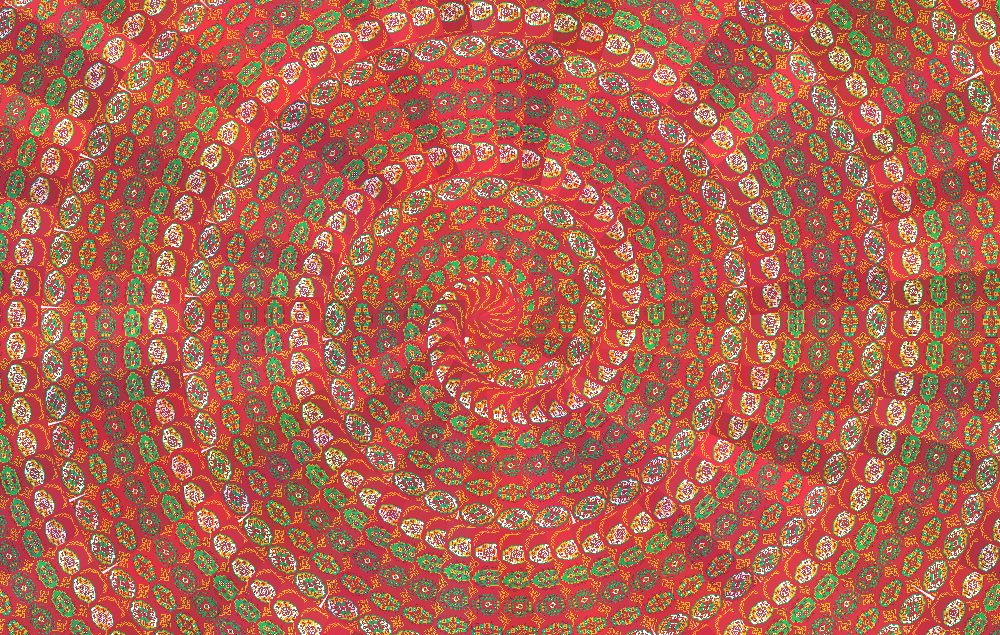
New Photoshop Pattern Trick
New Adobe Photoshop has so many cool featured and one of them is a trick with pattern.
Note that this trick works only with latest Photoshop CC.
Steps:
1.Create a blank square document (for ex: 1000 x 1000)
Click File -> New and type in 1000 px to width and 1000 px to height. Set Resolution 72. You can leave background to white or transparent.
2. Set Pattern
Download this file and open it in photoshop. When pop-up box comes just be sure that Mode is set as RGB.
Now click Edit -> Define Pattern… and give the desired name to your pattern. Now you can close the downloaded pdf file document
and switch back to your main document.
3.Create Unique Pattern
Now press shift + backspace and pop up for Fill menu will appear. From Contents submenu choose Pattern and from Custom Pattern select the pattern you have just created. Set Script to Spiral and hit enter or press ok. Additional submenu will appear, and you can have some fun here with different variations. Heres my values:
- Pattern Scale – 0.1
- Ring Spacing – 0
- Pattern Spacing – 0
- Keep Pattern Upright – Uncheck (Also Fun Result When Checked ON)
- Color Randomness – 0.1
- Brightness Randomness – 0.1

Spiral Pattern of Turkmen Artworks created with Photoshop Pattern by www.didar.sovbetov.com
Heres my result and you can try some other variations with different values, have fun!
Share your thoughts